Linux Time Management for Cassandra


Linux Time Management for Cassandra
Author: Hayato Shimizu
In distributed databases, time is more than just a clock-ticking—it's the foundation for consistency. At AxonOps, we work closely with companies deploying Apache Cassandra at scale, and one recurring topic we encounter is clock synchronization. Unlike Google's Spanner, which uses GPS and atomic clocks, Cassandra relies on precise yet conventional clock synchronization methods. Let’s explore why clock management is critical for Cassandra, and how to do it right.
Why Cassandra Needs Accurate Time Sync
Apache Cassandra uses a last-write-wins (LWW) conflict resolution model. Every write is timestamped (in microseconds) and the highest timestamped value is considered the most recent. This model works well in theory but can go dangerously wrong when system clocks drift:
- Inconsistent conflict resolution: If Node A thinks it's 10:00:05 and Node B thinks it’s 10:00:03, a write from Node B can appear stale even if it’s logically more recent.
- TTL expiration issues: Time-To-Live (TTL) expiration relies on accurate clocks. A clock drift can cause premature or delayed data expiry.
- Gossip coordination: Successfully coordinating gossip requires Cassandra server time to be synchronized with each other.
Thus, Cassandra nodes must keep their clocks tightly synchronized—not to a global standard like UTC, but with each other.
NTP: The Unsung Hero of Cassandra Consistency
Time synchronization across machines is technically challenging. At a glance, syncing clocks might seem simple, but when you account for network jitter, system load, virtualization layers, and different hardware clock sources, maintaining microsecond-level precision becomes a non-trivial engineering problem.
The difficulties compound when nodes are geographically dispersed or run on shared infrastructure where timekeeping stability varies. Packets carrying time updates might be delayed or arrive out of order. Virtual machines may experience time drift due to CPU scheduling. Even small inconsistencies in kernel clocksource selection or leap second handling can create subtle but dangerous issues in a distributed database like Cassandra, where timestamps determine truth.
NTP (Network Time Protocol) is the standard solution to this problem. It works by polling trusted time sources and adjusting the local system clock gradually, using algorithms that filter noise and adapt to network latency. It’s more than a background process—it's the unsung component underpinning data consistency in distributed environments like Cassandra.
Let's walk through how to set up NTP correctly for Cassandra.
Basic Setup Guidelines
- Install NTP: Use chrony ntpd or ntpsec, depending on your OS.
- Use multiple NTP sources: Reduce the risk of a single point of failure.
- Enable drift correction: Let NTP discipline your system clock gradually.
- Avoid time jumps: Never manually reset clocks while Cassandra is running. Use slewing.
Chrony Configuration Examples on Linux
Here's a sample chrony.conf configuration suitable for most Cassandra deployments:
server 169.254.169.123 iburst       # AWS Time Sync example
server time.google.com iburst       # Public NTP fallback
server 0.pool.ntp.org iburst        # Optional

makestep 1.0 3                      # Step clock if offset > 1 sec in first 3 updates
rtcsync                            # Sync RTC with system clock
logdir /var/log/chrony             # Log location
allow 192.168.0.0/16               # Allow LAN access (optional)
To enable and verify Chrony:
sudo systemctl enable chronyd --now
chronyc tracking
Tips for Hardware and OS Configuration
- Disable CPU frequency scaling: CPU throttling can introduce timing anomalies. Lock CPU frequency if possible.
- Monitor clock skew: Use AxonOps!
Configure Reliable Clock Source (TSC)
On modern x86_64 CPUs, the preferred clock source is usually TSC (Time Stamp Counter). TSC is fast and accurate if it's constant and invariant across cores. Linux can use several clock sources (TSC, HPET, ACPI_PM), but TSC is typically the most efficient.
To check the active clock source:
cat /sys/devices/system/clocksource/clocksource0/current_clocksource
To list available options:
cat /sys/devices/system/clocksource/clocksource0/available_clocksource
If TSC is available and reliable, enforce it by adding to your kernel boot parameters:
clocksource=tsc tsc=reliable
This ensures that the OS doesn’t switch to a slower or less precise clock source under load. You may also want to disable HPET and other fallbacks in your BIOS or kernel settings if you’re seeing inconsistencies.
Implementing NTP in Public Clouds
Each major cloud provider offers recommended or managed NTP services. Use these over the public pool when possible.
AWS
Amazon Time Sync Service provides a highly available and accurate time source that is accessible from all EC2 instances across all AWS regions. It uses a fleet of satellite-connected and atomic reference clocks in Amazon's global infrastructure.
Unlike traditional NTP, the service does not require outbound internet access and offers extremely low latency by using the local VPC network. This reduces exposure to jitter and external disruptions, making it highly suitable for distributed systems like Cassandra.
- Use Amazon Time Sync Service: 169.254.169.123
- Recommended in all regions; no need to go public.
- Ensure chrony.conf or ntp.conf includes this address.
Google Cloud (GCP)
Google Cloud provides a built-in, highly available NTP service accessible from all VMs via metadata.google.internal or 169.254.169.254. This service is backed by Google's internal atomic clocks and is optimized for low latency and high precision across GCP regions.
GCP also implements leap second smearing, spreading the additional second over a 24-hour period to avoid any disruptive jumps or clock freezes. This behavior is particularly beneficial for distributed systems like Cassandra, where sudden time changes can cause anomalies.
- Use Google's internal NTP: metadata.google.internal or 169.254.169.254
- Chrony works well here.
Azure
Azure Linux VMs support high-precision time synchronization using Precision Time Protocol (PTP) through the /dev/ptp device exposed by the hypervisor. This provides better accuracy and lower latency than traditional NTP.
Most modern Azure Marketplace images (e.g., Ubuntu 19.10+, RHEL 7.4+, CentOS 8+) are preconfigured to use chronyd with PTP. However, you can manually ensure your configuration includes:
refclock PHC /dev/ptp0 poll 3 dpoll -2 offset 0
This directive instructs chronyd to use the Azure hypervisor's PTP device (/dev/ptp0) as its primary time source.
Verification Steps:
- Check that the PTP device exists:
ls /dev/ptp*
- Confirm that the ptp_kvm kernel module is loaded:
sudo modprobe ptp_kvm
- Restart Chrony and validate time sync status:
sudo systemctl restart chronyd
chronyc sources
Optional Fallback:
You can also add public NTP servers as fallback options in case the PTP source becomes unavailable:
server ntp.ubuntu.com iburst
Note: The PTP time source in Azure does not advertise a stratum. You can optionally set a manual stratum in chrony.conf (e.g., stratum 2) if needed for organizational consistency.
Self-Managing an NTP Cluster for Cassandra
If you're running Cassandra in an environment where you can’t rely on public or managed NTP services, setting up your own internal NTP cluster is a best practice.
Architecture Overview
- Three-node NTP cluster: Deploy three dedicated NTP servers that peer with each other and also sync with trusted, low-latency, low-stratum public time sources.
- Peering: Use the peer directive in Chrony or ntpd to establish bidirectional trust among the three nodes.
- External sync: Each node should sync with at least two external sources.
- Failover for Cassandra: Configure Cassandra nodes to point to one NTP node as prefer, and the other two as failover.
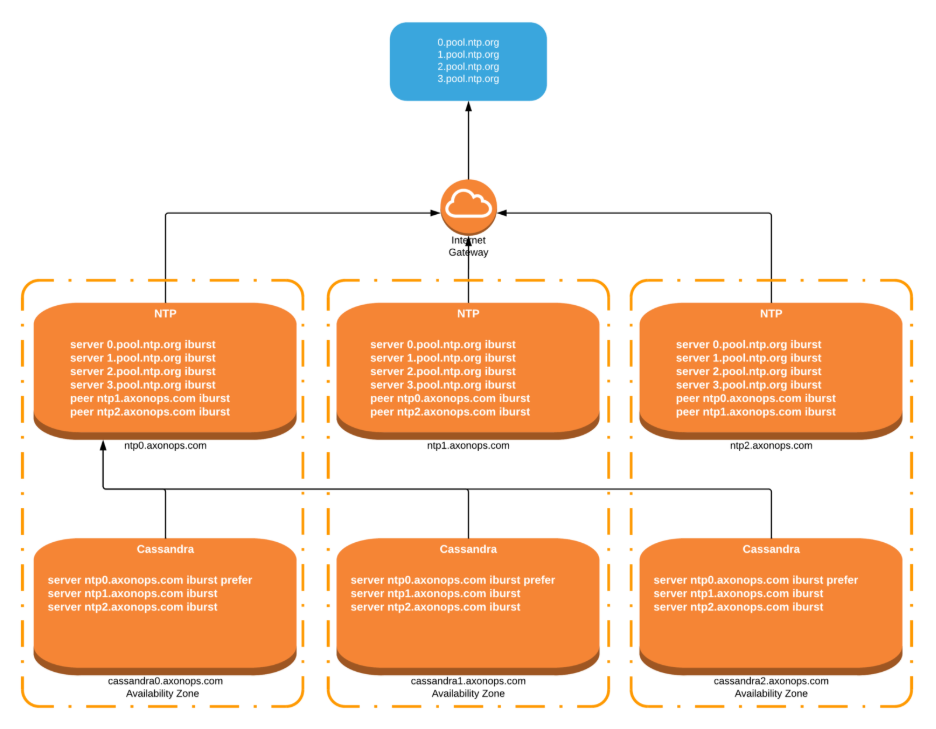
Example Chrony Configuration for NTP Nodes
ntp0.axonops.com
server 0.pool.ntp.org iburst
server 1.pool.ntp.org iburst
peer ntp1.axonops.com iburst
peer ntp2.axonops.com iburst
local stratum 10
makestep 1.0 3
rtcsync
ntp1.axonops.com
server 0.pool.ntp.org iburst
server 1.pool.ntp.org iburst
peer ntp0.axonops.com iburst
peer ntp2.axonops.com iburst
local stratum 10
makestep 1.0 3
rtcsync
ntp2.axonops.com
server 0.pool.ntp.org iburst
server 1.pool.ntp.org iburst
peer ntp0.axonops.com iburst
peer ntp1.axonops.com iburst
local stratum 10
makestep 1.0 3
rtcsync
Cassandra Node Configuration Example
server ntp0.axonops.com iburst prefer
server ntp1.axonops.com iburst
server ntp2.axonops.com iburst
The prefer keyword ensures Cassandra nodes prioritize a single source of consistent reference time, while the failover nodes provide resilience.
Stratum Considerations
Each NTP server operates at a certain "stratum" level. Stratum defines how far away the server is from a reference clock (e.g., an atomic clock):
- Stratum 0: Reference clocks (e.g., GPS, atomic clocks)
- Stratum 1: Directly connected to Stratum 0 devices
- Stratum 2: Syncs from Stratum 1, and so on
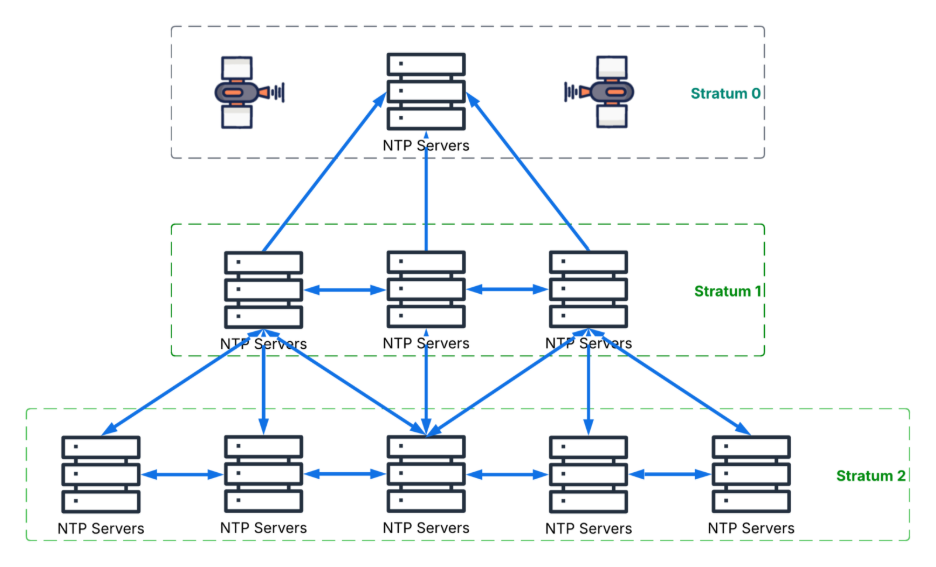
For a self-managed NTP cluster, it's important to:
- Sync your internal NTP servers from reliable Stratum 1 or 2 sources
- Avoid sources with high latency or inconsistent availability
- Set a local stratum (e.g., 10) on your internal servers using local stratum 10 in chrony.conf to ensure they do not accidentally advertise themselves as more authoritative than true Stratum 1 sources
By carefully selecting upstream sources and maintaining a low stratum where appropriate, your internal cluster can maintain accuracy and avoid forming a timing feedback loop or mistakenly acting as a primary time authority.
Multi-DC Cassandra Topology Considerations
For Cassandra deployments spanning multiple data centers (DCs), time synchronization becomes even more critical. Without tight synchronization, cross-DC consistency issues can arise, especially during read repairs, hinted handoffs, or inter-DC replication.
Design Approach
- Per-DC NTP Clusters: Each data center should run its own internal three-node NTP cluster for high availability and low latency.
- Upstream Peering: Each DC's internal NTP servers should synchronize with local stratum 1 or stratum 2 public sources or regional corporate NTP servers to minimize latency and drift.
- Cross-DC Backup Syncing: Optionally, allow one node in each NTP cluster to peer with a node in a different DC as a tertiary fallback. This helps maintain consistency if the local time sources become unreliable.
- Avoid Overlap: Ensure that Cassandra nodes in DC A only reference NTP servers in DC A to avoid WAN-induced time drift.
Why This Matters
- Network Variability: Time syncing across regions can introduce high jitter due to WAN latency, which skews timestamps.
- Fault Isolation: Keeping each DC’s NTP infrastructure isolated ensures that time drift in one location doesn’t affect the rest.
- Operational Simplicity: Maintenance and diagnostics are easier when each NTP domain is local to its Cassandra deployment.
By isolating NTP domains and using regional stratum sources, you create a robust and scalable timekeeping architecture that mirrors Cassandra’s decentralized nature.
Why This Architecture Works
- Consistency across the fleet: Nodes referencing the same primary source avoid drifting apart.
- Redundancy: If one NTP node goes down, others continue serving time without interruption.
- Minimized jitter and drift: Local network peering ensures low-latency time synchronization, reducing the impact of WAN variability.
Chronyd vs NTPd: What's the Difference?
When setting up time synchronization for Cassandra, operators typically choose between chronyd (from the Chrony suite) and ntpd (from the legacy NTP suite). While both fulfill the same role—keeping system time accurate—they differ in performance, features, and modern applicability.
chronyd
- Faster synchronization: Chronyd adjusts the clock more rapidly and accurately after large offsets, which is especially helpful on systems that are offline for extended periods.
- Better for virtual machines and mobile devices: It handles variable network and CPU environments more robustly.
- Smarter slewing: Slews time changes more smoothly without large jumps, which is safer for distributed systems.
- Active development: Chrony is actively maintained and recommended by most modern Linux distributions.
ntpd
- Traditional choice: The original NTP daemon, with a long history and wide compatibility.
- Slower adjustments: Takes more time to converge on accurate time, especially after large offsets.
- Largely replaced: Many distros now default to Chrony or systemd-timesyncd for new installations.
Recommendation
For most Cassandra environments, Chronyd is preferred due to its speed, accuracy, and stability in modern server workloads.
Leap Seconds and Distributed Databases
A leap second is an occasional one-second adjustment added to Coordinated Universal Time (UTC) to compensate for Earth’s slowing rotation. It ensures that atomic time (TAI) stays aligned with solar time. Since 1972, leap seconds have been inserted roughly every 18 months, though their schedule is irregular and determined by the International Earth Rotation and Reference Systems Service (IERS).
In distributed systems like Cassandra, leap seconds can cause temporary inconsistencies or failures if nodes handle the insertion differently. For example, some nodes might repeat the same second, while others may freeze briefly or jump ahead.
How NTP Handles Leap Seconds
Standard NTP servers signal an upcoming leap second by setting the "Leap Indicator" bit in advance. Well-implemented NTP clients (like Chrony and ntpd) will handle this by slewing the clock—slowing it down just enough so that no explicit jump or freeze is needed when the leap second occurs.
Cloud Vendor Handling
- AWS: Amazon Time Sync Service smears leap seconds across the final day of the month, spreading the extra second gradually to avoid disruptions. This method is consistent and eliminates the risk of sudden time shifts.
- Google Cloud: Google also uses leap second smearing, distributing the extra second over 24 hours to prevent anomalies.
- Azure: Azure follows the traditional leap second approach, with guidance for using compatible NTP clients that support slewing or freezing behavior without crash risk.
- Linux Distributions: Most modern distros running Chrony, ntpd, or systemd-timesyncd handle leap seconds gracefully when configured correctly.
What Cassandra Operators Should Do
- Ensure consistent NTP clients across nodes: Disparate behavior increases the risk of inconsistency.
- Use slewing where possible: Avoid step adjustments during active database operations.
- Monitor time skew proactively: Leap second events are typically announced 6 months in advance—make a plan.
- Cassandra Clients: Depending on the driver version, the WRITETIME may be being set by the driver. Make sure the applications writing to Cassandra is also synchronizing to the same NTP source.
How AxonOps Helps
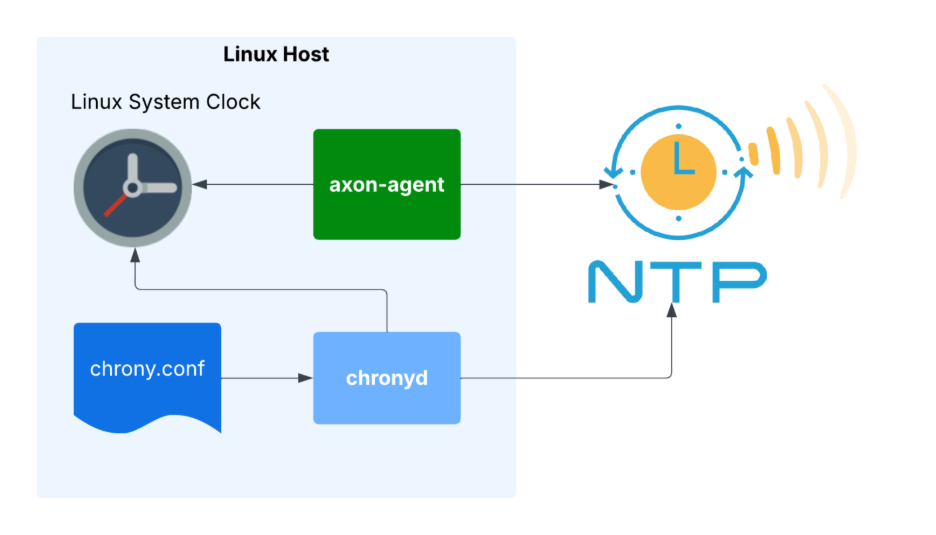
AxonOps monitors time drift between Cassandra nodes out of the box. Our agents continuously track clock skew and surface real-time alerts when drift exceeds safe thresholds. With built-in visualizations and integration into your existing observability stack, staying on top of clock health has never been easier. It's one less thing to worry about, so your team can stay focused on scaling reliably.
Conclusion
You do not need an atomic clock to run Cassandra like Google does for Spanner — but you do need a time synchronization strategy and organizational awareness. Synchronizing clocks across nodes isn’t optional; it’s absolutely critical for distributed databases like Apache Cassandra. At AxonOps, we help organizations run Cassandra clusters that are not only fast and scalable, but reliable. Time, after all, is the silent coordinator of every write, read, and repair.
About AxonOps
Organizations turn to AxonOps to democratize Apache Cassandra and Kafka skills through best-in-class management tooling, backed by world-class support. Built by experts, our unified monitoring and operations platform for Apache Cassandra and Kafka provides access to all of the capability required to effectively monitor and operate a Cassandra and Kafka environment via the APIs or UI of a single management control plane.
Latest Articles
Stay up-to-date on the Axonops blog

Book time with an AxonOps expert today!