AxonOps Cassandra® CommitLog Archiving and Point-in-Time-Restore Feature


AxonOps Cassandra® Commitlog Archiving and Point-in-Time-Restore Feature
By Hayato Shimizu
The AxonOps unified monitoring and operations platform ensures Apache Cassandra teams have all the tools at their disposal in one place to deliver the performance and reliability they need . Ensuring those teams are able to easily and reliably manage their backups has been a key component of the platform from day one, and working with the advanced capability of. Cassandra’s commitlog archiving has always been a challenge.
AxonOps is delighted to unveil the latest release of our backup capability, which has made the complex simple and will significantly enhance how you handle data backups and restorations: Commitlog Archiving and Point-in-Time Restore (PITR).
Understanding Cassandra Commitlog Archiving and Point-in-Time Restore
To fully appreciate the significance of AxonOps' new features, it’s important to understand what commitlog archiving and point-in-time restore (PITR) are in the context of Apache Cassandra.
Commitlog Archiving
In Apache Cassandra, the commitlog is a vital component of the database that records every write operation before it is applied to the data files (SSTables). This mechanism ensures durability and helps recover data in case of a node failure.
Commitlog Archiving takes this a step further by continuously saving these logs to a secure location. This process involves:
- Capturing Every Change: Every modification to the database, including inserts, updates, and deletions, is recorded in the commitlog.
- Archiving Logs: These logs are periodically copied to an external storage location, creating a history of all database operations.
- Ensuring Data Durability: In the event of a hardware failure or data corruption, the archived commitlogs can be used to reconstruct the state of the database.
This archiving process is essential for maintaining data integrity, enabling disaster recovery, and supporting compliance with data retention policies.
Point-in-Time Restore (PITR)
Point-in-Time Restore (PITR) is a powerful feature that allows you to restore your database to a specific moment in time. This is particularly useful for recovering from data corruption, accidental deletions, or other operational errors.
Here’s how PITR works in Apache Cassandra:
- Continuous Archiving: As mentioned, commitlogs are continuously archived, creating a comprehensive record of all database operations.
- Restore Process: When a restore is needed, the archived commitlogs are replayed from the last known good snapshot up to the desired point in time. This involves:
- Stopping the Database: Halting operations to ensure data consistency.
- Applying Logs: Reapplying the archived commitlogs to reconstruct the database state up to the specified timestamp.
- Restarting Operations: Bringing the database back online, now restored to the desired point in time.
PITR is invaluable for maintaining business continuity and minimizing data loss in critical situations. It provides a granular level of control over data recovery, allowing enterprises to revert their databases to any precise moment before an issue occurred.
Why Commitlog Archiving and PITR Matter
Commitlog archiving and PITR are not just advanced database features; they are essential tools for enterprise-grade data management. They ensure that:
- Data Integrity: Your data remains accurate and consistent, even in the face of failures.
- Disaster Recovery: You can recover quickly from unforeseen disasters with minimal data loss.
- Regulatory Compliance: You meet stringent data retention and auditing requirements.
- Operational Resilience: You can handle accidental data modifications or deletions without significant downtime.
The Traditional Challenges of Cassandra Commitlog Archiving and Point-in-Time Restore
Typically, setting up Commitlog Archiving and Point-in-Time Restore in Cassandra is a complex and time-consuming process. It involves configuring various components, ensuring compatibility between different systems, and maintaining an intricate setup that can often be fragile and prone to errors. These configurations require in-depth knowledge and continuous monitoring to ensure everything runs smoothly.
Configuring Commitlog Archiving
To set up commitlog archiving in Cassandra, you need to configure the cassandra.yaml file. Below is an example of how to set this up:
Step 1: Enable Commitlog Archiving: commitlog_archiving:
enabled: true
archive_command: 'cp %path /path/to/backup/directory/%name'
restore_command: 'cp /path/to/backup/directory/%name %path'
restore_directories:
- /path/to/restore/directory
restore_point_in_time: '2024-06-18T12:00:00Z'
Step 2: Create a Script for Archiving Logs:
#!/bin/bash
LOG_SOURCE=$1
LOG_DESTINATION=/path/to/backup/directory/$(basename $LOG_SOURCE)
cp $LOG_SOURCE $LOG_DESTINATION
Step 3: Set Up Storage Management
Ensure you have adequate and secure storage for the archived logs. This can involve setting up network storage solutions or cloud-based storage.
Performing Point-in-Time Restore
Restoring to a specific point in time typically involves several steps:
Step 1: Stop Cassandra:
sudo service cassandra stop
Step 2: Restore Data
Use the restore_command configured earlier to copy the archived commitlogs back to their original location or a new location designated for the restore process.
cp /path/to/backup/directory/commitlog_file /var/lib/cassandra/commitlog/
Step 3: Configure the Restore Point in Time
Update the cassandra.yaml to specify the exact point in time to restore.l
restore_point_in_time: '2024-06-18T12:00:00Z'
Step 4: Start Cassandra:
sudo service cassandra start
Step 5: Monitor and Verify
Ensure that the restored data is correct and the system is functioning as expected.
Options for utilizing Cassandra commitlog archiving for point-in-time-restore?
Cassandra commitlog archiving is a powerful capability but complex to work with. Here are options to consider.
- Specialist commercial backup tools: The likes of Cohesity and Rubrik deliver point-in-time-restore for Cassandra.
- Unified management tools: AxonOps delivers support for both open source Apache Cassandra and DataStax Enterprise. DataStax provides support via OpsCenter solely for DataStax Enterprise, their commercial distribution of Cassandra.
- Custom Scripts: Many organizations resort to custom scripting often in combination with open-source projects such as Medusa which will demand considerable expertise and ongoing management.
Why AxonOps for Cassandra point-in-time-restore?
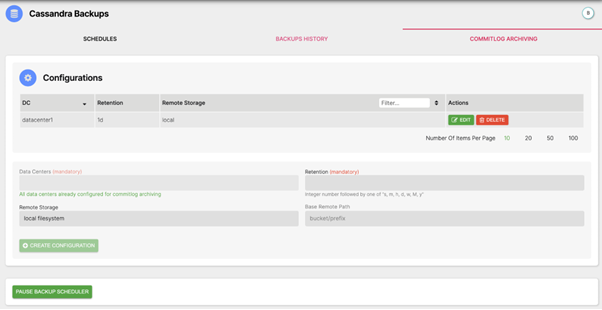
- Seamless and reliable integration to Cassandra commitlog archive
The AxonOps seamless integration with Commitlog Archiving ensures that every change made to your Cassandra database is captured and securely stored. With AxonOps, archiving commit logs is a robust, integrated process that guarantees your data is always protected.
- Precision restoration made simple
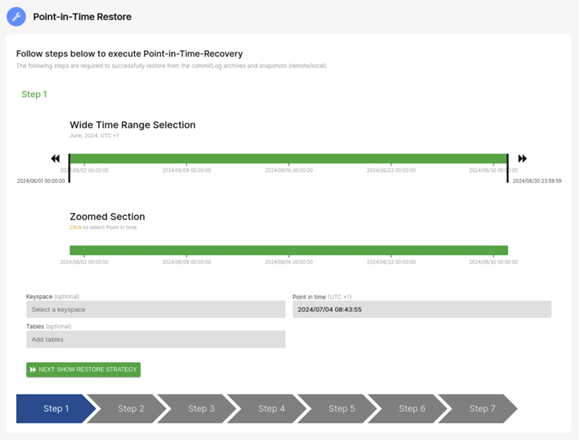
AxonOps' Point-in-Time Restore makes the restoration of your data to a precise moment in time effortless and robust. Whether you are recovering from an accidental data loss, catastrophic failure or data breach, PITR allows you to restore your database to any specific point in time with unparalleled accuracy and ease.
- Back up to any storage anywhere
AxonOps understands that flexibility in choosing backup locations is crucial for modern businesses. That's why our solution supports a wide range of target backup locations, including:
- Local Storage: Keep your data close and easily accessible.
- SSH/SFTP: Securely transfer your backups to remote servers.
- Amazon S3: Leverage the power of AWS for scalable and durable storage.
- Google Cloud Storage (GCS): Tap into Google’s robust cloud infrastructure.
- Azure Blob: Utilize Microsoft Azure for high-availability and resilient data storage.
No matter where you prefer to store your backups, AxonOps has got you covered, ensuring that your data is safe and easily retrievable.
Conclusion
AxonOps already delivers a robust Cassandra backup and restore capability relied upon by many Cassandra accounts. The addition of the Commitlog Archiving and Point-in-Time Restore capability with simplicity of zero configurations and dynamic switching sets a new standard for unified Cassandra monitoring and operations. Whether you're a seasoned Cassandra user or just starting out, these features will empower you to manage your data with unprecedented control and confidence.
More Information
AxonOps Documentation – https://docs.axonops.com/pitr/overview/
AxonOps Free Starter (6 Nodes) - https://axonops.com/pricing/
AxonOps Demo Sandbox - https://axonops.com/demo-sandbox/
Get in touch - community@axonops.com
Latest Articles
Stay up-to-date on the Axonops blog

Book time with an AxonOps expert today!